Acervo Organizer

Organize years of photos and videos without risking a single file.

For photographers and drone pilots with drives and NAS boxes full of messy folders and repeated copies. Acervo Organizer shows you the result before moving anything, never overwrites or deletes, and undoes any organization with one click.

Download on the Mac App Store

Free for 14 days. Then a one-time unlock, no subscription.

For Macs with macOS 13 or later. In English and Portuguese.

Does this library look familiar?

Copies of copies. "FINAL BACKUP", "FINAL BACKUP 2", the same photo on the Desktop and on the external drive. Nobody knows which one can go.

Card folders, not your work. 100CANON, 101CANON, 102CANON, and the March shoot spread across three places.

Drone footage without telemetry. The MP4 went to one folder; the .SRT and .LRF were left behind.

Afraid to touch anything. Apps that move and rename everything at once, with no way back. Better to leave it as it is.

Corrupted files found too late. The photo that won't open shows up right when the client asks for it.

A NAS that drops mid-way. The connection goes away and you don't know what was moved and what stayed.

Made for people who can't lose a file.

Four rules Acervo Organizer never breaks.

  • Nothing is overwritten

    If a file with the same name already exists at the destination, the new one gets (2), (3)… or stays where it is, with the reason explained.

  • Nothing is deleted

    Duplicates and problem files go to their own folders. The final decision is always yours.

  • You see it first

    The simulation shows where each file goes and any name conflicts before anything moves.

  • Everything can be undone

    Every organization is recorded on your Mac. One click puts every file back where it was.

Built for the files you actually have.

Portrait and event photographers

From a messy card to a library by date, with RAW and JPG side by side.

  • RAW + JPG pairs recognized and kept together
  • Lightroom and Camera Raw XMP sidecars travel with the photos
  • Folders by capture date, read from EXIF
  • Duplicates found by content, not by name
  • Corrupted or empty photos flagged before a client asks for them
  • Memory card import with verified copies and an optional second copy
PHOTOS/2025/2025_03_14/IMG_0001.CR3

Drone pilots and 360° cameras

Every video keeps its telemetry, proxy and thumbnail.

  • .SRT telemetry always next to the video
  • .LRF and .LRV proxies kept together, in a _PROXIES folder or where they are
  • DJI Avata 360 (.OSV) and Insta360 (.insv and .insp), with both lenses together and original names
  • Recording date read from the video itself
  • GoPro: .LRV proxies and .THM thumbnails recognized
VIDEOS/2025/2025_09_20/DJI_0001.MP4 + .SRT + .LRF

Three steps, no surprises.

  1. Choose the folder

    On your Mac, an external drive or a NAS. The app only accesses the folders you choose.

  2. Simulate

    See how many files will move, where they go and what would conflict. Nothing is changed.

  3. Organize

    Keeping your folders or by capture date. Changed your mind? Undo puts everything back.

Try It Free for 14 Days

The trial is free and needs no subscription.

A look inside the app.

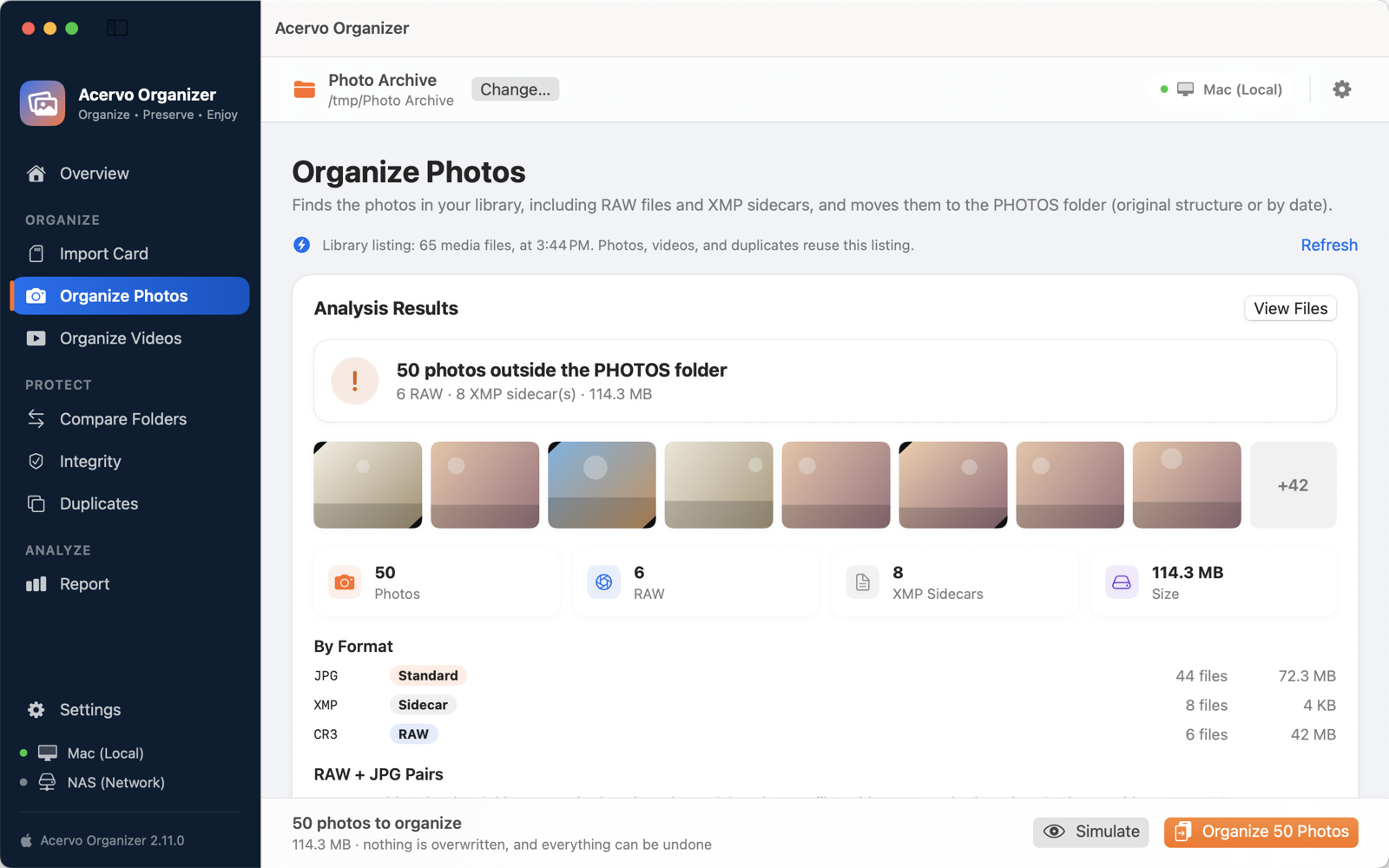
Organize Photos screen with the analysis result
The analysis shows photos, RAW files and XMP sidecars before anything moves.
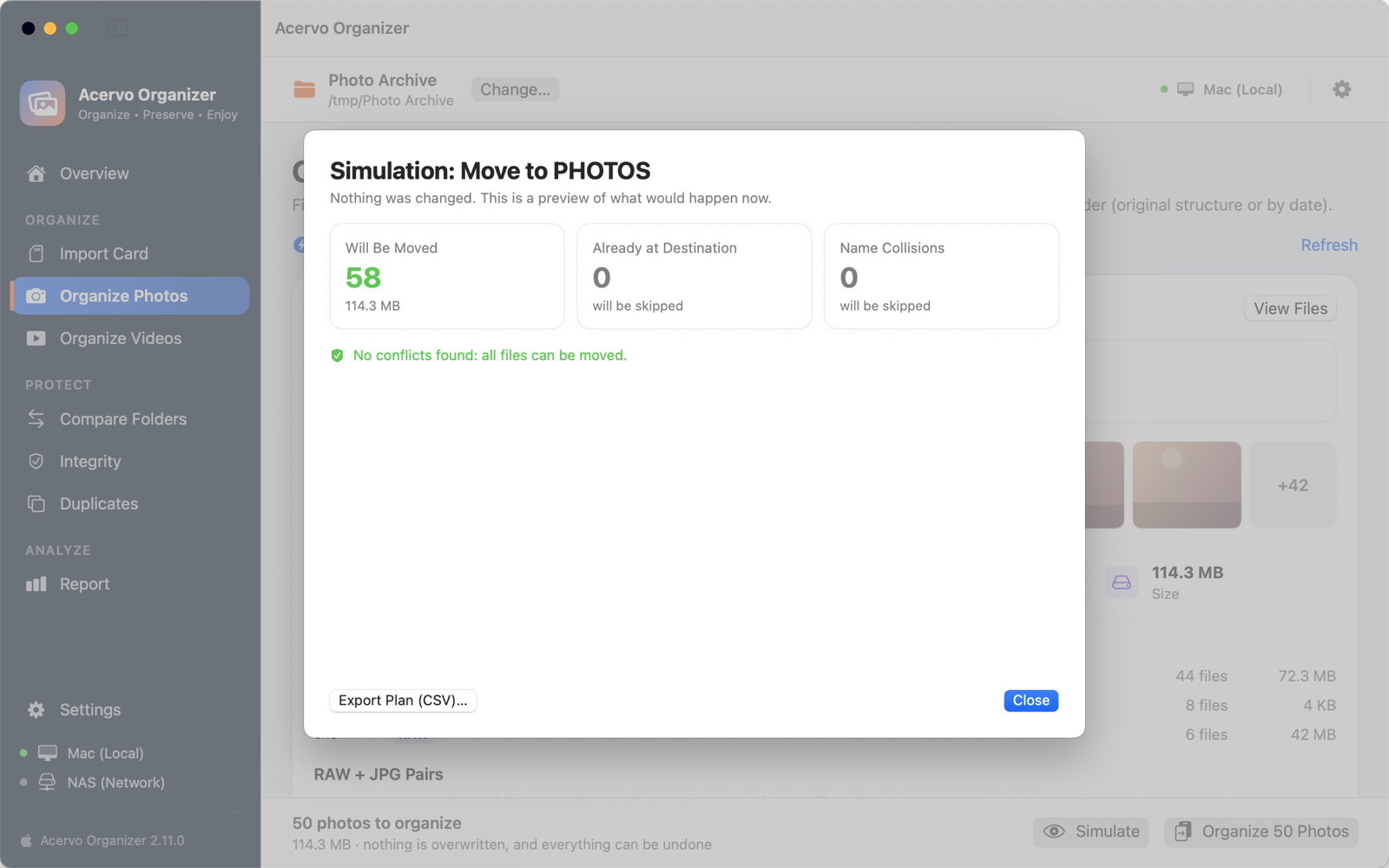
Simulation window with the destination of each file
The simulation lists where each file goes.
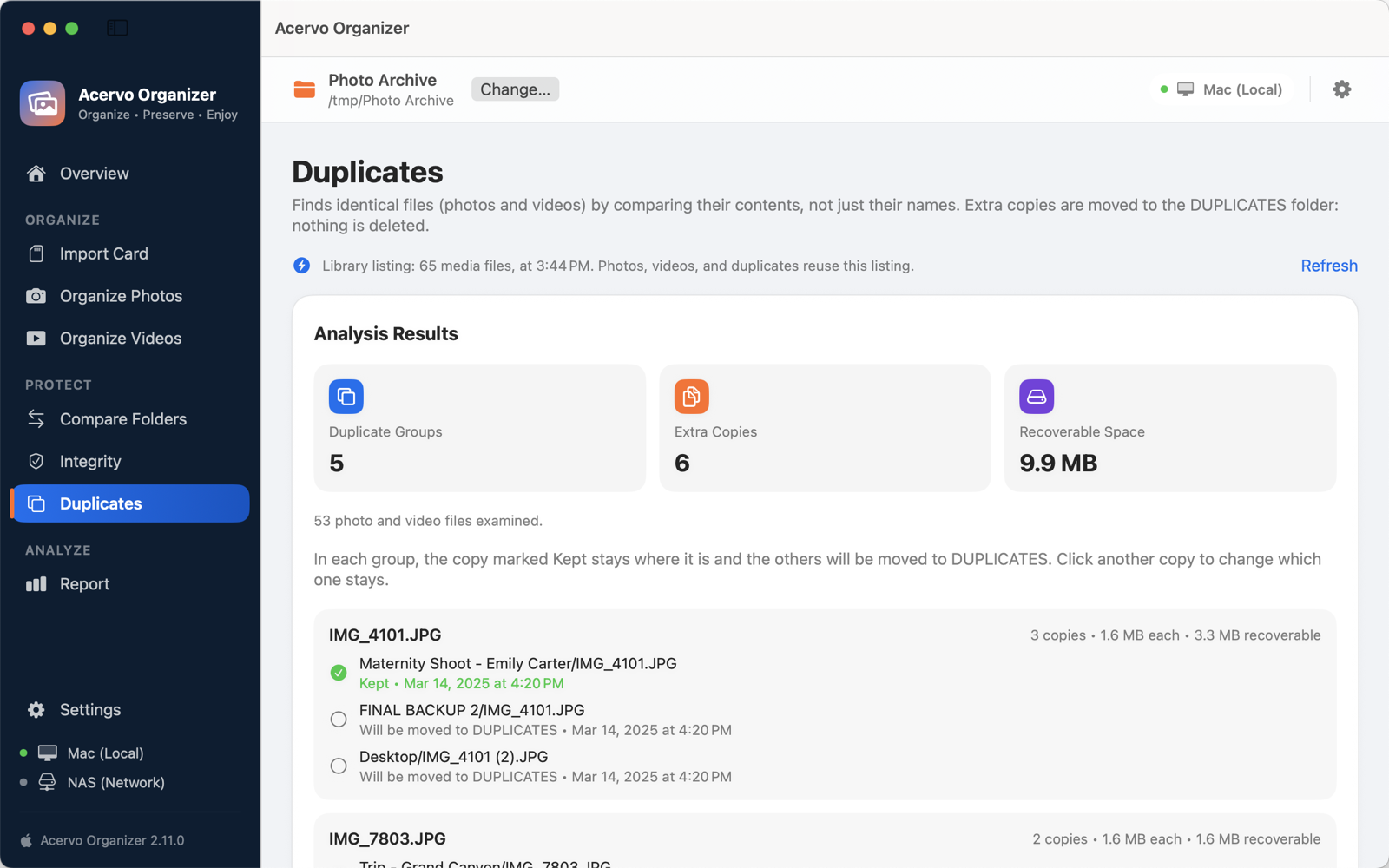
Duplicates screen with groups of identical files
Duplicates found by content, keeping the best-organized copy.

Everything in the app.

Organize photos
Keeping your folder structure or by capture date, with RAW + JPG pairs and XMP files together.
Organize videos
With the telemetry, proxies and thumbnails from drones and action cameras.
Import from a memory card
Copies checked by checksum (SHA-256), an optional second copy on another drive, and folders by date and session. The card is only read.
Duplicates
Identical files found by content. Extra copies go to the DUPLICATES folder.
Integrity
Empty files, corrupted photos, incomplete videos and wrong extensions, with optional quarantine. It also finds empty folders and removes them, if you want.
Compare folders
Check your library against the backup and see what's missing on each side, without changing anything.
Sync folders
Make the backup on an external drive or NAS match your library, in Mirror or Add and Update mode. You review the plan first, every copy is verified by SHA-256, and anything that would be replaced or removed goes to the acervo_versoes folder. It can be undone.
Library report
Counts, formats, largest files and fullest folders, exported as TXT and CSV.
Safe on a NAS
Checks the connection during long operations and stops safely if the volume drops.

Pay once, no subscription.

Free trial

14 days

  • Every feature available
  • No charge and no subscription
  • After the trial, analysis, simulation, duplicates, integrity, comparison, reports and undo stay free

Lifetime unlock

Pay once

  • Organize, import and move files with no time limit
  • Copy what's missing to your backup
  • Works on your Macs signed in to the same App Store account
  • One-time purchase through the App Store
Download on the Mac App Store

Sync & Backup optional

Pay once

Keeps your backup matching your library, in Mirror or Add and Update mode, with the plan reviewed first. It's separate from the unlock, and the 14-day trial covers both.

The App Store shows the price in your country's currency before you buy.

A family of apps for people who can’t lose a file

Acervo Organizer tidies up what you already have. From the same maker, two more apps take care of every new card and of all your backups.

  1. Before · your old archive

    Acervo Organizer

    Organizes years of photos and videos scattered across hard drives and NAS, without risking a single file.

    • Shows the result before anything moves
    • Finds duplicates by content, not by name
    • Undoes any organization in one click
    You are here
  2. Today · every new card

    FlightFrame Studio

    Takes the card all the way to an organized project and Lightroom, with every file verified.

    • Copies and backups verified by SHA-256
    • Flights, sets and on-device AI culling
    • Tells you when the card is safe to format
    On the Mac App Store Meet FlightFrame Studio
  3. Always · your whole library

    Photo Backup Guardian

    Checks that every photo and video in your library has its 3-2-1 backup copies, even files that never went through FlightFrame.

    • External drives, NAS and cloud folders, without downloading anything
    • Completes missing copies, without deleting or overwriting
    • “Can I erase this disk?” before you reuse a drive
    On the Mac App Store Meet Photo Backup Guardian

All three follow the same rules: nothing is overwritten, nothing is deleted, every copy is verified by its content, and your photos never leave your Mac. FlightFrame Studio and Photo Backup Guardian also share the same standard for folders, copies and reports.

Frequently asked questions

Is Acervo Organizer free?

The download is free and the first two weeks come with everything unlocked. After that, analysis, simulation, duplicates, integrity, comparison, reports and undo stay free. To keep organizing, importing and moving files, the unlock is a one-time purchase, no subscription. Folder sync in Mirror or Add and Update mode is a separate one-time purchase, Sync & Backup.

Can the app delete or damage my files?

No. It never deletes and never overwrites. Duplicates and problem files are moved to their own folders, and every organization can be undone. Between different drives, the app copies, verifies, and only then removes the original.

Does it work with a NAS?

Yes, with the NAS volume mounted on your Mac, such as a Synology or QNAP over the network. The app checks the connection during long operations and stops safely if it drops; what was already moved is recorded and can be undone.

Does the app back up my library?

It keeps your backup up to date: it compares your library with the backup folder, on an external drive or a NAS, and makes them match. Copying what's missing to the backup comes with the unlock. Mirror and Add and Update modes are in the Sync & Backup purchase, paid once. You review the plan before anything is copied, every copy is verified by SHA-256 and nothing is deleted: replaced versions and files that only existed in the backup go to the acervo_versoes folder. The sync can be undone.

Does it work on my Mac?

It works on Macs with macOS 13 or later, with Apple silicon or Intel processors.

What about my Lightroom catalog?

XMP files travel with the photos. If the folders are already in a Lightroom Classic catalog, moving photos outside Lightroom makes the catalog lose track of them; after organizing, use Lightroom's option to find the missing folder and point it to the new place.

Which formats are supported?

Photos in JPG, HEIC, PNG, TIFF and the main RAW formats (CR3, CR2, NEF, ARW, RAF, DNG, ORF, RW2 and others), with XMP. Videos in MOV, MP4, MTS, MKV, AVI and others, with .SRT, .LRF, .LRV and .THM. 360° videos from DJI (.OSV) and Insta360 (.insv and .insp).

Does the app collect my data?

No. There is no account, no ads, no usage analytics and no tracking, and your photos never leave your drives. See the privacy policy.

Can I use it on more than one Mac?

Yes. The unlock works on Macs signed in to the same App Store account. On a new Mac, go to Settings, License, View Options…, Restore Purchases.

What’s the difference between Acervo Organizer, FlightFrame Studio and Photo Backup Guardian?

Each one covers a different moment of your work. Acervo Organizer tidies up what’s already on your drives and NAS: it organizes by date, keeps RAW, XMP and telemetry together and sets duplicates aside. FlightFrame Studio handles every new card: it copies with verification, organizes the project, makes the backup and the third copy, tells you when the card is safe to format and checks again the copies it made. Photo Backup Guardian watches your whole library, including what never went through FlightFrame, across every drive and cloud folder, checks the online-only copies in OneDrive, Dropbox and Backblaze B2 without downloading anything, warns you when a 3-2-1 copy is missing and, if you turn on automatic copies, makes the missing ones. Use one, or all three together.

Which languages does the app support?

English and Portuguese (Brazil). The app follows your macOS language; to choose another one just for Acervo Organizer, go to System Settings › General › Language & Region › Applications. New users get destination folders named PHOTOS, VIDEOS, DUPLICATES and PROBLEMS.
Your library deserves better than a folder called FINAL BACKUP 2.

Try it free for 14 days. Nothing is overwritten, nothing is deleted.